Drop-in ACH Payments for Your Next.js Site
A production-ready same-day ACH integration for any Next.js 16 site on Vercel. Ships with one-time checkout, recurring subscriptions, dunning, loyalty tiers, settlement verification, saved payment methods, and distributed rate limiting.
Apply for the ACH program at GMS →
gms-ach-plugin.zip
Source files, Drizzle schema, Vercel cron config, and test fixtures. Preserve the directory structure when you unzip.
What the checkout looks like live
Here's the ACH checkout running in production on a Next.js commerce site using this exact plugin. Routing + account fields with inline confirm-account validation, account type dropdown, save-for-later checkbox, and an order summary with an automatic ACH discount applied to incentivize customers away from card.
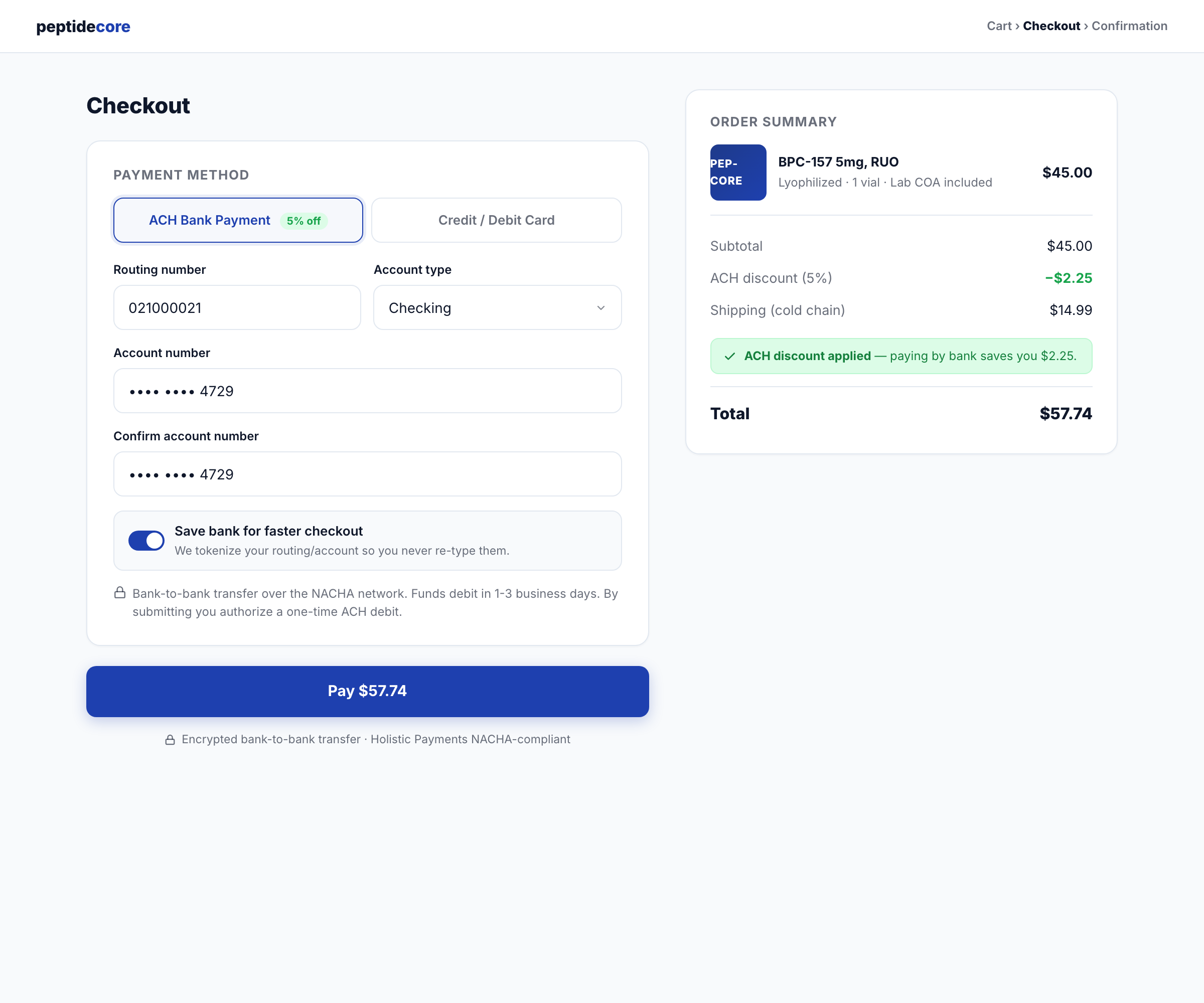
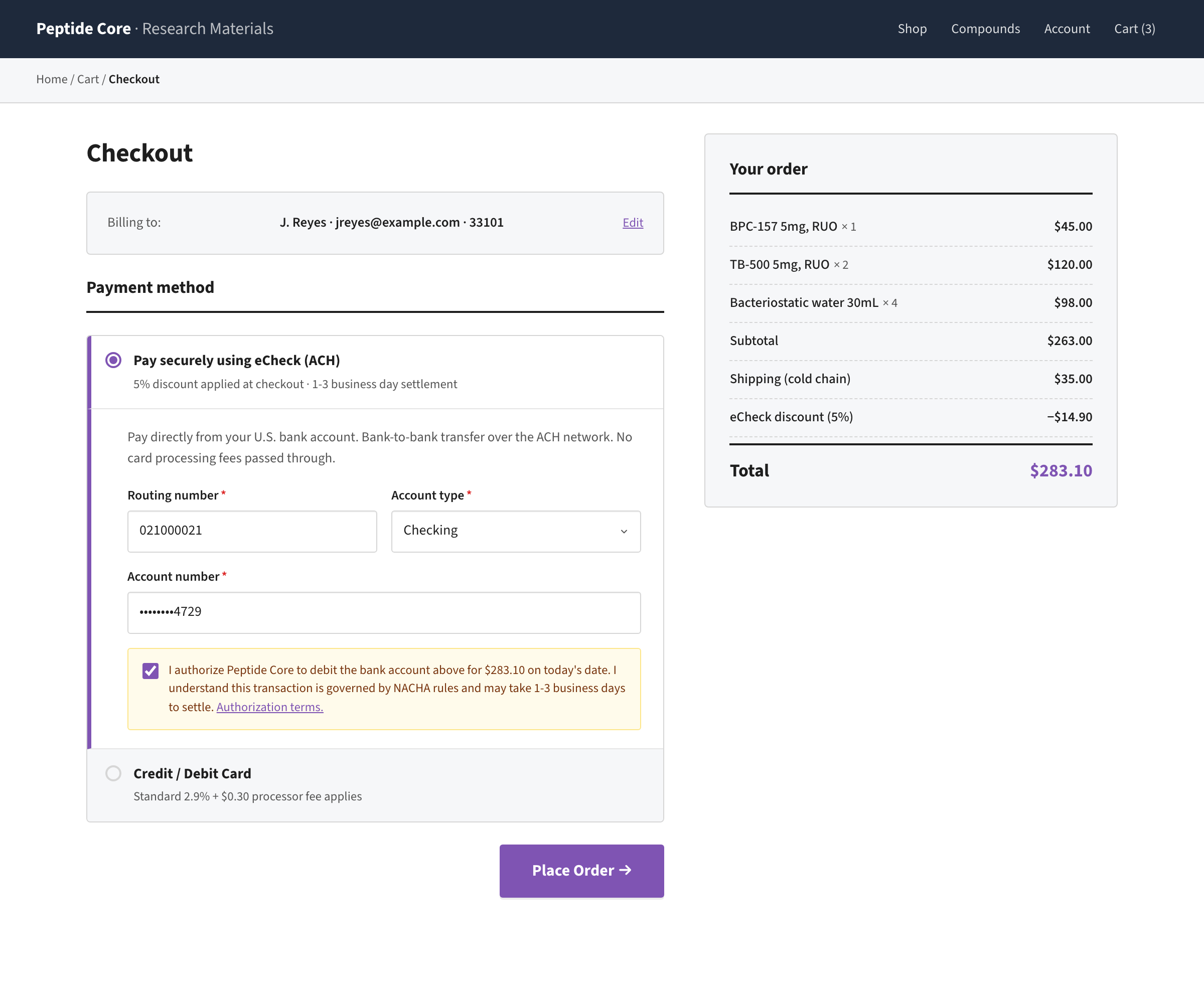
$57.74 after a 5% ACH discount ($2.25 off a $45 subtotal + $14.99 shipping). Your UI, your pricing logic, plugin just handles the debit.If your site is on WordPress instead, the same ACH program drops into WooCommerce checkout via our companion plugin. Different theme, same underlying payments infrastructure:
What this gives you
When installed and wired up, your site supports:
- One-time ACH checkout, customer enters routing + account once, gets charged, order created.
- Recurring ACH subscriptions, 30/60/90-day (or any custom) cadence with automatic dunning on failed charges.
- Loyalty tier escalation, discounts grow with customer tenure (bronze → silver → gold → platinum at 4/8/14 successful charges).
- Settlement verification, ACH debits take 2–3 business days to settle; a daily cron confirms every pending debit and claws back affiliate commissions on declines.
- Saved payment methods, customers can save their bank account (AES-256-GCM encrypted at rest) for one-click repeat checkout.
- Idempotent checkout, double-click protection via Upstash-backed idempotency keys. No accidental double-charges.
- Distributed rate limiting, Upstash-backed, survives lambda cold starts, can't be bypassed by parallel requests.
- Pre-charge email reminders, customers get notified 3 days before each recurring charge.
- Admin-ready events, every subscription action (created, charged, retry scheduled, paused, cancelled, tier upgraded) logged to
subscription_eventsfor audit + reporting.
No external subscription service. No per-transaction SaaS fees beyond GMS + Upstash. Runs on your own stack.
Who this is for
- Direct-response brands that moved off Stripe/Braintree because of MATCH-list restrictions (RUO peptides, kratom, and other Tier 1 high-risk verticals) and need a working ACH program that doesn't get shut off.
- Agencies building Next.js commerce sites who want ACH + subscriptions without stitching together Stripe Connect + an external billing service.
- Solo operators on Next.js + Vercel + Neon + Drizzle who want to own their billing stack instead of renting Chargebee/Recurly.
Not for you if:
- You're on Stripe / Adyen / Braintree and they let you process your vertical. Just use Billing.
- You're not on Next.js. Most of this can be ported but the API route layer assumes App Router.
- You don't have a GMS merchant account yet and don't want one. GMS is the whole point here.
Requirements
| Requirement | Why |
|---|---|
| GMS (Gulf Management Systems) merchant account | The actual ACH program. Apply at gms-operations.com; 3–7 business day approval. They issue api_id, gms_id, api_key. |
| Next.js 16+ (App Router) | The plugin is all App Router route handlers. Pages Router would need porting. |
| Vercel Pro ($20/mo) | Cron jobs + 900 s function timeouts. Hobby tier cron is too limited. |
| Neon Postgres (or any Postgres) | Subscription records, encrypted credentials, audit trail. |
| Drizzle ORM | Schema is declared in Drizzle. Prisma users can port but you'll rewrite the queries. |
| Upstash Redis | Rate limiting + idempotency. Provisioned in 60 seconds via Vercel's Upstash integration. Free tier (500K commands/month) is plenty. |
| TypeScript strict | Everything's typed. Strict mode catches the money-path bugs. |
| Email provider | You supply a sendEmail({ to, subject, html }) helper. Mailtrap, Resend, Postmark, SendGrid, doesn't matter which. |
| Existing commerce schema | You need users, addresses, orders, order_items tables already. The plugin adds subscription tables on top. |
Before you start
Gather these:
- Your GMS credentials from your merchant account onboarding email:
api_id,gms_id,api_key. - A Vercel Pro project linked to your codebase.
- Your Neon (or Postgres) connection URL already in your project's
.env.localand Vercel env. - A working email helper at
src/lib/email.tsexportingsendEmail. - An auth helper at
src/lib/auth.tsexportingrequireAuth()that returns{ id, email, firstName, lastName }or throws. - Somewhere to click, you'll be hitting Vercel CLI + dashboard a few times.
Installation
Step 1, Download and unzip
unzip gms-ach-plugin.zipYou get a gms-ach-plugin/ folder with source files, schema, and docs.
Step 2, Install dependencies
From your project root:
npm install @upstash/redis @upstash/ratelimitOther deps (drizzle-orm, zod, next, react, @neondatabase/serverless) are assumed already present in a typical Next.js commerce project.
Step 3, Provision Upstash Redis
npx vercel integration accept-terms upstash --yes
npx vercel integration add upstash/upstash-kv
This installs Upstash as a Vercel integration and auto-injects KV_REST_API_URL, KV_REST_API_TOKEN, KV_URL, REDIS_URL into your project's production + preview + development environments. No manual env-var entry needed.
Step 4, Generate and set secrets
Generate two secrets:
openssl rand -hex 32      # → ENCRYPTION_KEY (for routing/account encryption)
openssl rand -base64 32   # → CRON_SECRET (protects /api/cron/* from public access)
Add both to Vercel production:
npx vercel env add ENCRYPTION_KEY production     # paste hex value
npx vercel env add CRON_SECRET production        # paste base64 value
Step 5, Add GMS credentials
npx vercel env add GMS_API_ID production    # paste from GMS onboarding email
npx vercel env add GMS_API_KEY production   # paste UUID from same email
npx vercel env add GMS_ID production        # paste short merchant ID
Step 6, Copy source files
Preserve the directory structure exactly. From inside the unzipped gms-ach-plugin/ folder:
# Copy library code
cp src/lib/gms.ts        /path/to/your/project/src/lib/
cp src/lib/crypto.ts     /path/to/your/project/src/lib/
cp src/lib/idempotency.ts /path/to/your/project/src/lib/
cp src/lib/rate-limit.ts /path/to/your/project/src/lib/

# Copy API routes
cp -r src/app/api/checkout/ach       /path/to/your/project/src/app/api/checkout/
cp -r src/app/api/subscriptions      /path/to/your/project/src/app/api/
cp -r src/app/api/payment-methods    /path/to/your/project/src/app/api/
cp -r src/app/api/cron/subscriptions /path/to/your/project/src/app/api/cron/
cp -r src/app/api/cron/gms-settlement /path/to/your/project/src/app/api/cron/
cp -r src/app/api/cron/subscription-reminders /path/to/your/project/src/app/api/cron/

# Copy test
cp scripts/test-gms-parser.ts /path/to/your/project/scripts/
Step 7, Merge the Drizzle schema
Open migrations/schema-additions.ts from the plugin. You'll find:
- 4 new tables,
subscriptions,subscription_items,subscription_events,saved_payment_methods. Copy thepgTabledeclarations into yoursrc/lib/db/schema.ts. - New columns for your existing
orderstable, documented at the top of the file. Add these to your existingorderspgTable:paymentStatus(varchar 30, default "unpaid")paymentGateway(varchar 20)gmsTransId,gmsRefId,gmsMaskedAccount(varchars)subscriptionId(uuid, FK to subscriptions)notes(text)
Then push to your database:
npx dotenv-cli -e .env.local -- npx drizzle-kit pushStep 8, Merge the cron config
Open your project's vercel.json (create one if it doesn't exist) and add:
{
  "crons": [
    { "path": "/api/cron/subscriptions", "schedule": "0 10 * * *" },
    { "path": "/api/cron/subscription-reminders", "schedule": "0 9 * * *" },
    { "path": "/api/cron/gms-settlement", "schedule": "0 14 * * *" }
  ]
}
Schedules are UTC. Adjust if your ops team wants different windows.
Step 9, Resolve brand-specific imports
The plugin references a few helpers that may or may not exist in your project. Grep for them and fix up:
grep -rn "getProductBySlug\|scoreOrder\|createCommissionIfReferred\|pushOrderToShipStation\|getLineTotal" src/| Import | Used for | What to do if you don't have it |
|---|---|---|
getProductBySlug from @/lib/products | Checking if a product has noShipping: true to skip shipping fees | Either add a noShipping flag to your product type, or remove the allNoShipping conditional and always charge shipping |
scoreOrder from @/lib/fraud-score | Fraud scoring before GMS charge | Stub with async () => null if you don't want fraud scoring, or plug in your own scorer |
createCommissionIfReferred from @/lib/affiliate | Affiliate commission creation on sale | Remove the line if you don't have an affiliate program |
pushOrderToShipStation from @/lib/fulfillment | Auto-push confirmed orders to ShipStation | Remove if you have a different fulfillment pipeline |
getLineTotal from @/lib/discounts | Line item total (supports volume discounts) | Replace with item.price * item.quantity if you don't have volume pricing |
Also do a brand-name sweep, there are a handful of email-template strings that say things like "Stillwater BioLabs." Replace with your brand.
Step 10, Test the GMS connection
Before sending any real-money traffic. Run:
npx tsx scripts/test-gms-parser.tsExpected output: 5/5 passed, 0 failed. This confirms the parser handles all four real GMS response shapes (success, decline, SOAP fault, plain-text error) plus a garbage fallback. If this fails, the credentials/wiring is wrong, fix before proceeding.
Step 11, Deploy and smoke-test
npx vercel --prodOnce deployed:
- Create a test user in your DB.
- Create a test product priced at
$3(low enough that you won't mind burning the test money). - Sign in as the test user, add the product to cart, check out with real bank routing + account numbers (yours, for the test).
- Confirm in your database:
- A new row in
orderswithpaymentGateway = 'ach',paymentStatus = 'pending', a populatedgmsTransId. - No rows in
subscriptions(unless you set up a recurring test).
- A new row in
- Over the next 2–3 business days, watch
paymentStatusflip frompending→completedas the settlement cron runs.
That confirms one-time checkout works end-to-end.
Step 12, Optional: add the UI
The plugin is backend-only. To add the UI pieces that drive it, see the reference implementation (a production Stillwater-style e-commerce site), specifically these files:
CheckoutClient.tsx, card/ACH tabs, address selector, idempotency key generation, saved-method pickerSubscribeOption.tsx, subscription cadence radio buttons on product pages/account/subscriptions/page.tsx, user-facing subscription management/admin/AdminDashboard.tsx, admin subscription tab with pause/resume/cancel
These aren't in the plugin zip because they're tightly coupled to each brand's UI system. Use them as a template.
What to monitor after launch
Week 1
- Watch for
charge_failedevents insubscription_eventswith reason =decryption_failed→ indicatesENCRYPTION_KEYwas changed after subscriptions existed; don't do that. - Watch for
charge_db_failureevents → customer was charged but order row didn't save. Manually reconcile via GMS portal + your DB. - Watch Upstash command usage. At normal checkout volume you're nowhere near 500K/month free tier.
Ongoing
subscription_eventsis your audit log,chargedevents should vastly outnumbercharge_failed. If failure rate climbs above ~3%, investigate (NSF rate? bad bank data entry? customers with closed accounts?).- Set up dead-man-switch monitoring on the three crons via healthchecks.io or cronitor.io. Each cron has a
HEARTBEAT_URL_*env var, set it to the health-check ping URL and you'll get alerted if a cron stops firing. - ACH disputes (NACHA returns) come back through GMS. Check the GMS merchant portal weekly for any
R01(insufficient funds),R02(account closed),R03(no account), etc. Plugin logs the decline reason toorders.notes.
Troubleshooting
Q: Checkout returns "Payment was declined. Please check your bank details and try again." with no additional info.
The plugin's default prod behavior is to hide the raw GMS response from the customer. To see what GMS actually said, check Vercel runtime logs, the plugin logs [GMS] declined / [GMS] api_error / [GMS] soap_fault / [GMS] parse_error with the raw XML. In dev (NODE_ENV !== 'production'), the raw response is also returned in the JSON body under gms_debug.
Q: Subscription cron ran but no charges went through.
Check subscription_events in the DB for error entries. Common causes: (a) CRON_SECRET mismatch → cron returns 401 before processing; (b) all subscriptions had lastChargeEpoch matching today already (idempotency guard fired); (c) no subscriptions had nextChargeDate <= now.
Q: Customer charged but no order created.
Look for charge_db_failure events. This is the one scenario where the plugin can leave a customer in a bad state (GMS accepts, DB fails). The admin alert email (ADMIN_ALERT_EMAIL env var) fires when this happens. Manual reconciliation: look up the gmsTransId in the GMS portal, confirm the debit, manually create the order row, set paymentStatus = 'pending' so the settlement cron takes over.
Q: Upstash rate limit seems to not be firing.
Check KV_REST_API_URL and KV_REST_API_TOKEN are set in production. The plugin fails open when Upstash is unavailable (availability > security for rate limiting), so if the env vars are missing you won't see any errors, the limits just won't apply. Run npx vercel env ls production | grep KV_ to confirm.
Q: How do I rotate ENCRYPTION_KEY?
You can't, not safely, without a migration script. Rotating the key orphans every existing achRoutingEncrypted / achAccountEncrypted / savedPaymentMethods row. If you truly need to rotate, write a script that: (1) reads every encrypted row using the old key, (2) re-encrypts with the new key, (3) swaps the env var, (4) deploys. The plugin doesn't support keyring versioning out of the box, this is the main known limitation.
Q: What's the minimum amount I can charge via ACH?
GMS technically allows $1+. Some banks will bounce debits under $5 for fraud reasons. $3 is a safe floor for "this actually works" tests.
Q: Does this handle ACH returns (R01 / R02 / etc.)?
The settlement cron catches them and flips paymentStatus to failed, status to cancelled, and claws back affiliate commissions. It does not (yet) automatically pause the subscription on a return, that happens after 3 retry attempts via the dunning flow. If you want immediate pause on return, edit gms-settlement/route.ts to add a pause update when a subscription-linked order fails.
Files in the zip
Last updated April 19, 2026. Check this page for newer versions before trusting this snapshot for anything critical.
License
Private distribution. Do not redistribute without permission from the owner.
Ready to install?
Download the zip, work through the 12 steps, and your Next.js site has drop-in ACH + subscriptions.